Guide
Asset Inventory
Where to find it: Asset Inventory → All Assets
The Asset Inventory is the list of every device Velos Shield knows about on your network. For each device, it shows details that help you manage it, plus its current status and any related events.
Velos Shield builds this list in two ways: by quietly watching network traffic (network detection) and by asking devices directly for information (active query).
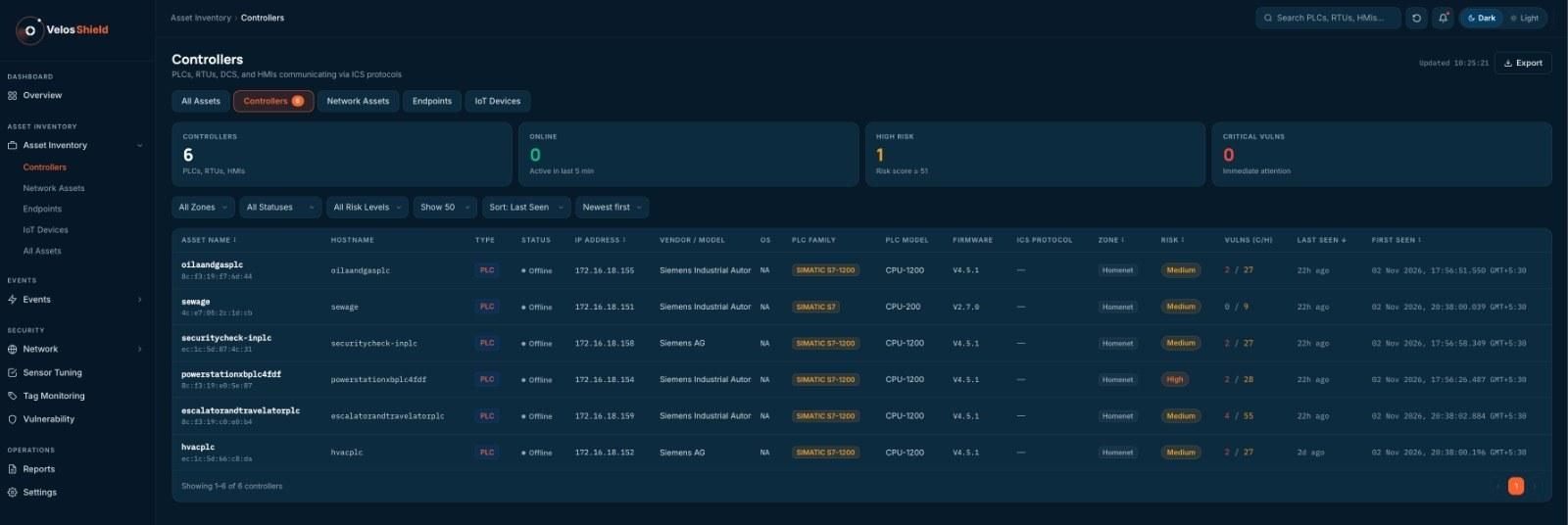
Figure 4. Controllers view with summary cards, filters, table, and Export action.
Viewing assets
The All Assets page shows every type of device. Separate pages show only one type at a time: Controllers and Modules, Network Assets, Endpoints, and IoT.
On the All Assets page you can explore three groups:
- Managed — Devices that have been added or approved by an administrator
- Intranet — Devices inside your internal network
- Discovered — Devices Velos Shield found automatically
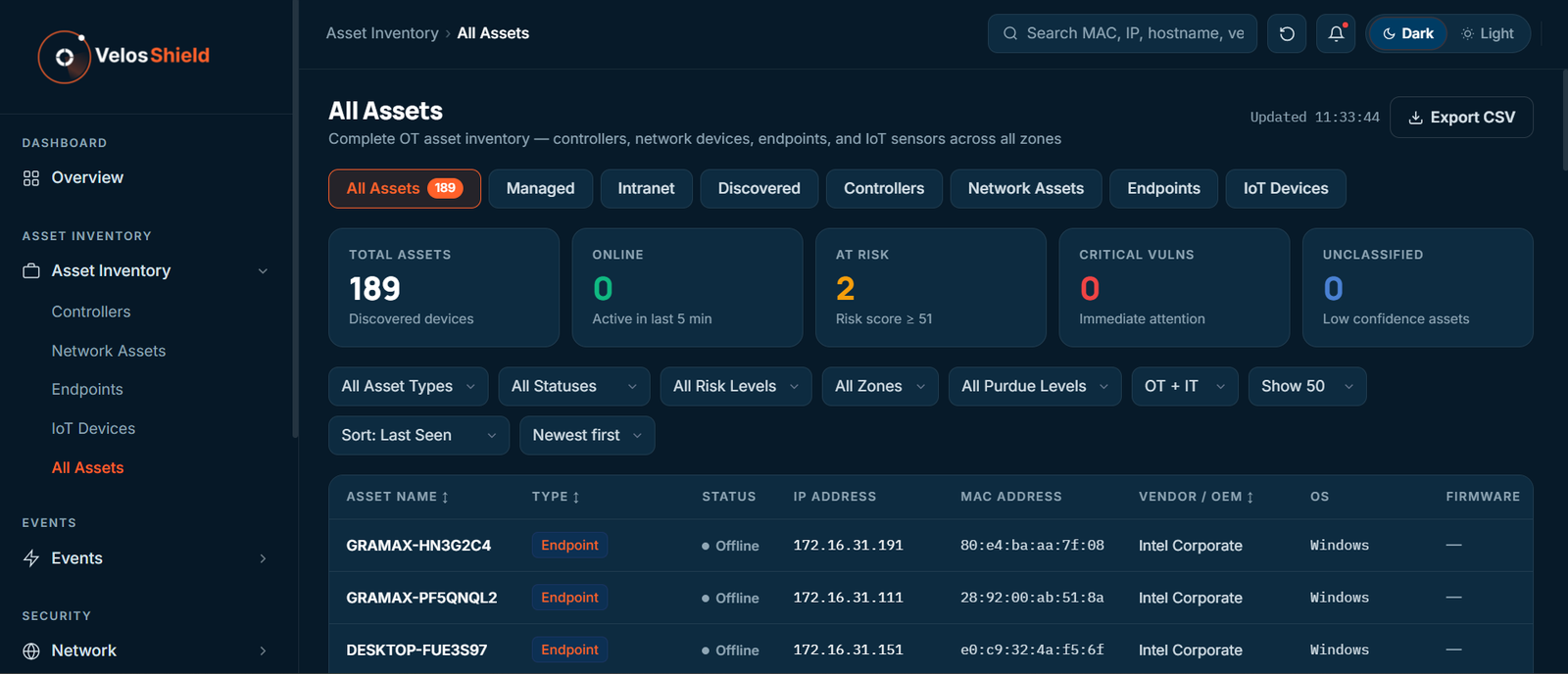
Figure 5: All Assets Page
Useful tools on this page
- Search bar — type a name, IP address, or other detail to find an asset.
- Export CSV — downloads the asset list as a CSV file that opens in Excel.
- Filters — narrow the list by Type, Status, Zone, Risk, Purdue level, and First/Last Seen.
Summary cards at the top
| Card | What it shows |
|---|---|
| Total Assets | How many devices have been found in total. |
| Controllers | How many controllers (devices that run machinery). |
| Network Devices | How many switches, routers, and similar devices. |
| Endpoints | How many computers and workstations. |
| IoT Devices | How many smart connected devices. |
| Online | How many devices are currently active on the network. |
| At Risk | How many devices have a risk that needs attention. |
| Critical Vulns | How many devices have Critical vulnerabilities. |
What each asset column means
| Column | What it tells you | Filter options |
|---|---|---|
| Asset Name | The name of the device on your network. | — |
| Type | What kind of device it is. | Controller, Network Assets, Endpoints, IoT Devices |
| Status | Whether the device is currently active. | Active, Recently Seen, Inactive, Unknown |
| IP Address | The device’s address on the network. | — |
| MAC Address | A unique hardware ID built into the device’s network card. | — |
| Vendor / OEM | The company that made the device. | — |
| OS | The operating system running on the device (for example, Windows or Linux). | — |
| Firmware | The version of the built-in software installed on the device. | — |
| Zone | The part of the network the device belongs to. | Homenet, Intranet, Internal, OT, IT, IoT, External, Unknown |
| ICS Protocol | The industrial protocol the device uses to communicate. | — |
| Risk | How risky this device is considered to be. | Critical, High, Medium, Low |
| Vulns (C/H) | How many Critical and High vulnerabilities the device has. | — |
| Purdue | The device’s Purdue level. | Level 4, 3, 2, 1, 0 |
| Services | The network services the device offers or uses, such as web or file sharing. | — |
| Open Ports | The network “doors” on the device that are open and accepting connections. | — |
| Conns | The number of network connections this device has taken part in. | — |
| First Seen | The first time Velos Shield saw the device connect or do something on the network. | Date range |
| Last Seen | The most recent time Velos Shield saw the device connect or do something. | Date range |
| PLC Family | The product series of a controller, as named by its maker. | — |
| PLC Model | The specific model of a controller. | — |
| Hostname | The name the device uses to identify itself on the network. | — |
Understanding Purdue levels
The Purdue model is a common way to organize industrial networks into layers, from the physical machinery up to the business office.
| Level | What lives here |
|---|---|
| Level 0 | The physical process: sensors, motors, valves, and other equipment. |
| Level 1 | Controllers (such as PLCs) that directly control Level 0 equipment. |
| Level 2 | Supervision and control screens (such as HMIs) used by operators. |
| Level 3 | Site operations systems that manage and coordinate production. |
| Level 4 | Business and office IT systems. |
Types of assets
| Category | What it means |
|---|---|
| Controllers | Devices that run and control industrial equipment, such as PLCs and their modules. |
| Network Devices | Devices that connect and direct network traffic, such as switches and routers, including their related components. |
| Endpoints | Computers used by people or for running software, such as engineering workstations, operator screens (HMIs), and servers. |
| IoT Devices | Smart connected devices such as sensors or cameras that are not traditional computers or controllers. |