Guide
Licensing
Feature access in VS Core is controlled by a signed license file. The license is bought for a site on the VelosShield website and downloaded from the customer account.
| Topic | How it works |
|---|---|
| Trial | A one-month, full-feature trial is available for evaluation. |
| Purchase | Licenses are bought for a site at www.velosshield.com. The file can be downloaded any number of times from your account and shows the purchase date, validity date and linked VS Core serial numbers. |
| Applying | Upload the license file to the appliance. The signature is verified before the license is applied; an altered file is rejected. |
| Checking | The appliance checks the license every 24 hours. |
| After expiry | After a purchased license expires, read-only access to security events and assets continues to work until a new license is applied. |
| PoC / Demo | Proof-of-concept licenses stop all features at expiry. Hardware used for a PoC is locked until an extended Demo license or a purchased license is applied. |
Note. Keep the license file as delivered. It is confidentiality-protected and signed; do not edit it.:
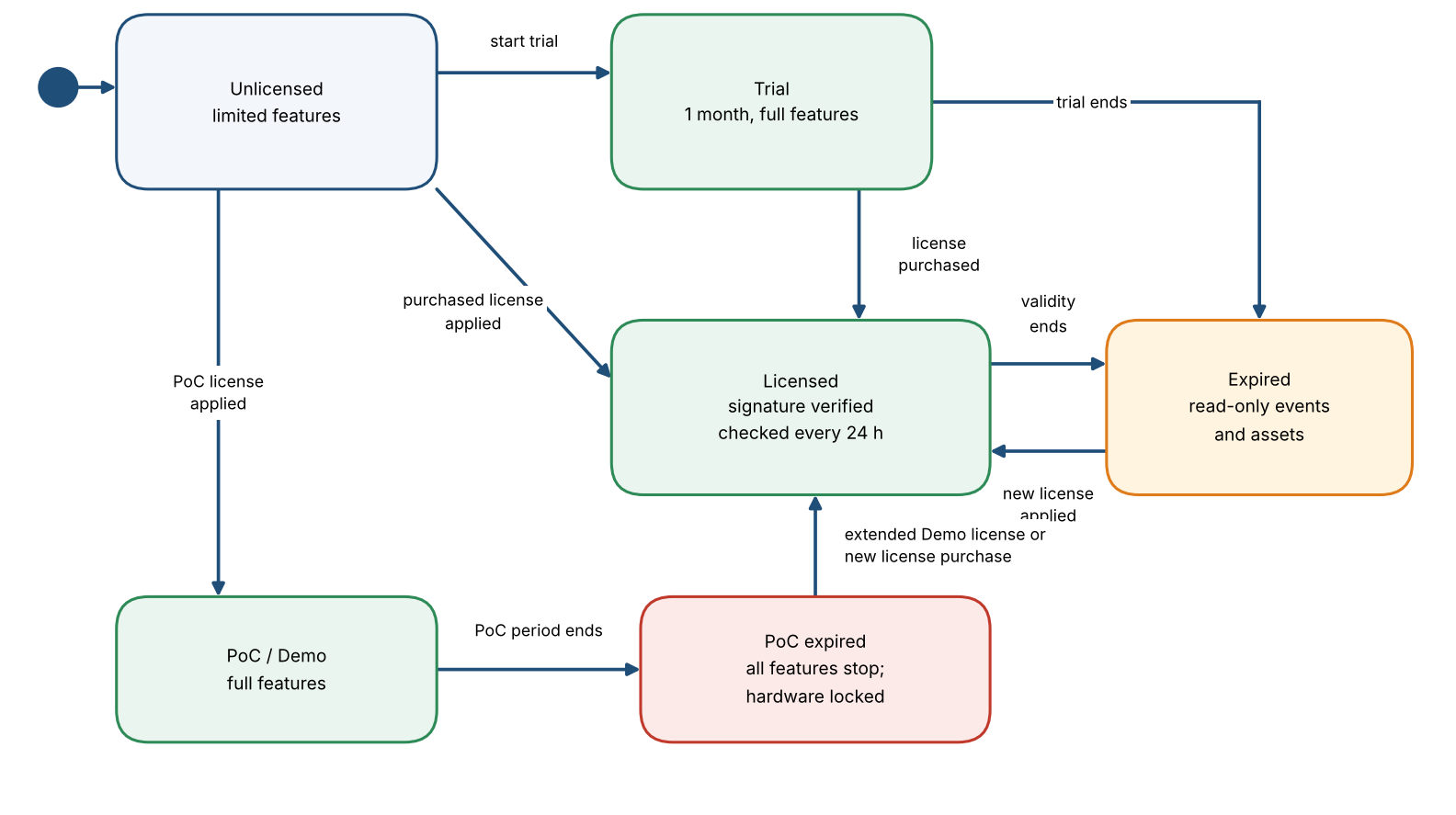
Figure 26. License states of VS Core.