Guide
Deployment Model
VS Core has three SPAN input ports, so it can take mirrored traffic from up to three segments of an OT site. Each SPAN port is connected to a mirror port of a managed switch. Traffic flows one way only, from the site into VS Core. A separate Management port is used to reach the dashboard.
| Connection | Purpose | Direction |
|---|---|---|
| SPAN 1 to 3 | Three input ports; each receives a mirrored copy of OT traffic from one site segment for analysis | Ingress only |
| Management | Dashboard access, license updates, NTP time sync and the optional VPN for remote monitoring and troubleshooting | Bidirectional, on the management network |
Placement guidance
- Mirror the uplinks or the switches that carry the traffic you most need to see (for example the link between the control network and the supervisory level) rather than every access port.
- Keep the Management port on a dedicated management network, separated from the OT network by a firewall. Do not connect the Management port to the monitored network.
- Confirm the switch mirrors both directions of traffic and that the mirror port bandwidth is sufficient for the monitored links. Over-subscribed mirror ports silently drop traffic and reduce detection coverage.
- Use the three SPAN ports to cover up to three OT segments of the site, one segment per port.
Network placement
Figure 1 shows VS Core in a site that has both an IT network and an OT network. The three SPAN input ports listen to mirror ports on the managed OT switches of up to three OT segments. The Management port sits on an isolated management network together with the NTP server and the administrator's PC. If you choose to use it, an optional VPN through the site firewall provides an encrypted tunnel to the VelosShield cloud, so that a SOC or the VelosShield team can monitor remotely and troubleshoot problems.
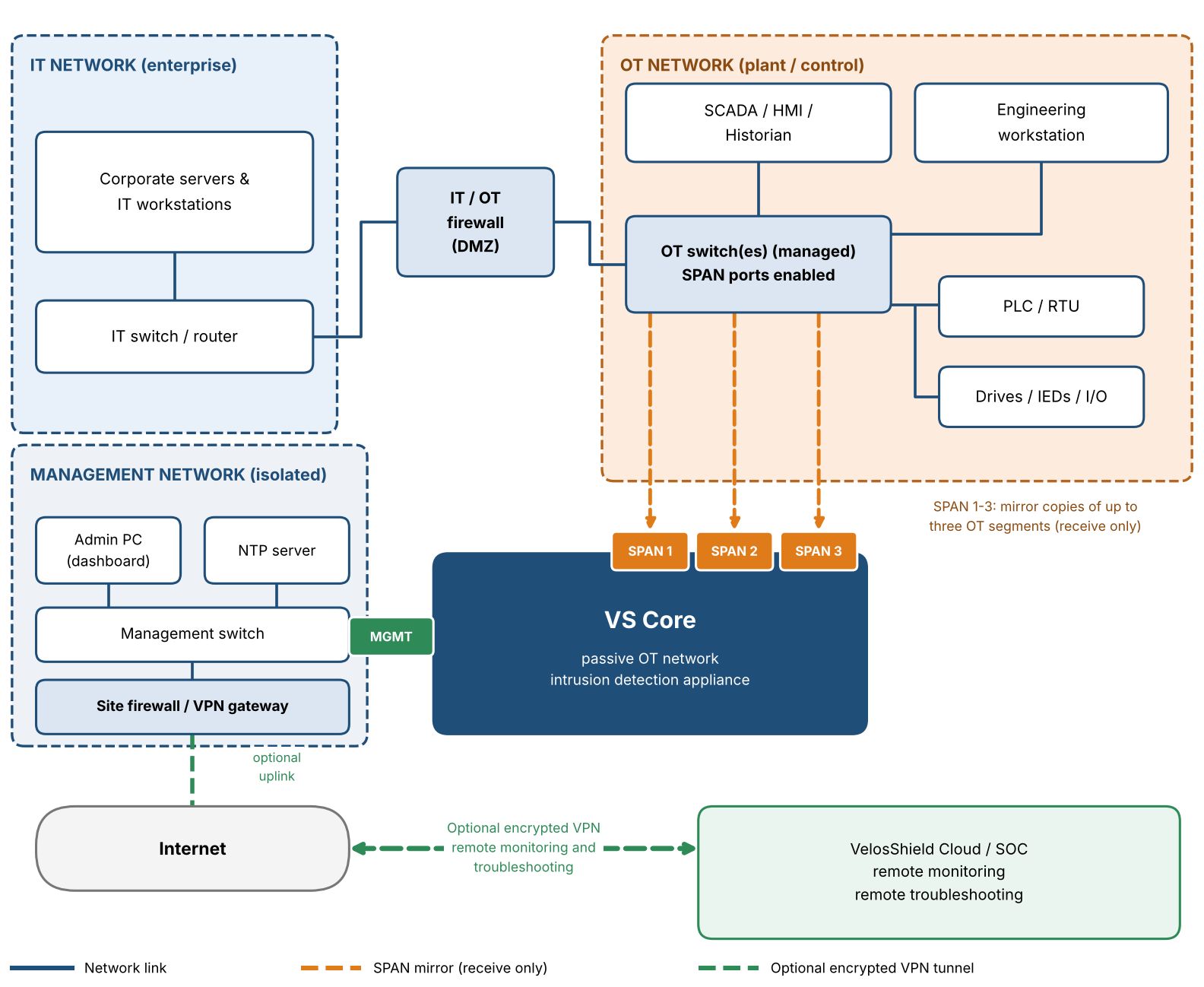
Figure 1. VS Core in a mixed IT and OT network, with NTP and an optional VPN to the VelosShield cloud for remote monitoring and troubleshooting.
- SPAN inputs are receive-only: VS Core never transmits onto the OT network.
- NTP is reached over the Management port from the management network; use a trusted, internal time source.
- Remote support is optional. When used, it runs over an encrypted VPN tunnel that is built from the site through the site firewall; the OT network is not exposed to the internet.
Installation and initial setup
Before you start
- Mount the appliance in a ventilated location; it is fanless, so leave clearance around the chassis.
- Confirm the switch SPAN configuration and a management IP address, subnet and gateway for the appliance.
- Have the license file from your VelosShield customer account available (see Section 15).
- Have the NTP source for the site ready so that event timestamps are reliable.
Setup steps
| # | Step | What to do |
|---|---|---|
| 1 | Connect | Connect the SPAN cables from the switch mirror ports to the VS Core SPAN input ports (up to three, one per OT segment), and the management cable to the management network. Then power on. |
| 2 | Wait for boot | Allow the appliance to complete start-up. |
| 3 | Open the dashboard | From a workstation on the management network, browse to the appliance management address. |
| 4 | Set credentials | Create the administrator account and set a strong, unique password at first login. Do not reuse passwords from other systems. |
| 5 | Set time | Configure the NTP server and confirm the system time is correct. Accurate time is essential for correlating events with other systems. |
| 6 | Apply the license | Upload the license file (Section 15). |
| 7 | Verify traffic | Open the system health view and confirm that SPAN bandwidth is non-zero on the connected SPAN ports and that assets start appearing in the asset list. |